
A personally refined robots.txt tool
I made this checker/validator/editor, or whatever you're more comfortable calling it, to evaluate robots.txt rules without having to deploy a new file for every experiment and wait to see what happens in the logs. Its function must be familiar to you, it compares one or more URLs with the directives in a robots.txt file, across a collection of personally found and selected web crawlers. It can also inspect a page's referenced resources to determine whether those same rules would allow a particular crawler to fetch its stylesheets, scripts, images, and other assets. Quite useful when a seemingly innocent Disallow rule has rather unintended consequences. It also doubles as a playground: fetch or paste a file, change a rule, invent a scenario, and see which directive wins. And hey! Nothing you change or save here gets published to your domain obviously.
The result is a rules-based evaluation to the best of my knowledge and available documentation, not a live conversation with Googlebot, Bingbot, or any other crawler. An Allowed result doesn't guarantee that a crawler will visit or index the URL. A Blocked result doesn't prove that every client on the internet will respect the restriction. Neither result tells you what happened during an actual crawler request. For that, inspect your server logs. Google's Search Console Crawl Stats and the crawling reports in Bing Webmaster Tools can also provide useful, though less granular, operational context.
How to use the checker
Start with a website address and use Fetch Live to retrieve its root-level robots.txt file. I've set up a dedicated Cloudflare Worker to handle these requests, rather than relying on the browser or a third-party proxy. This avoids the usual CORS restrictions and makes fetching a little more dependable, although websites can still refuse or interrupt requests because of network issues, security rules, rate limits, or other server-side restrictions. A failed fetch is not evidence that the website has no robots.txt file.
The fetcher can also follow up to five HTTP redirects, including those leading to another hostname, and reports the number followed and the final destination where applicable. It also handles certain www and non-www retrieval problems, without assuming the two hostnames are interchangeable. More on that further down.
You can also paste rules directly into the editor, type a new file from scratch, or drop a local .txt file into the dedicated field. The file is read in your browser rather than uploaded to this website. The editor's parser can flag certain problems (mainly typos), and you can copy or download the new or edited file. Ctrl/Cmd + S triggers the download as well. The result is a local robots.txt file; it does not update the server hosting your website(!).
Enter an absolute target URL, including http:// or https://, then select the crawler user-agents to test against the rules in the editor. I've already pre-selected a few user-agents that I think are best left allowed, per moi, but feel free to play with the list (142 user-agents so far) and the categories I've put together. Auto-check is enabled initially because I find it pointless to press Enter after every tiny edit; disable it if you prefer the familiar Check URL button. My beloved expanded multi-URL area accepts up to ten additional distinct URLs, one per line. Duplicate entries are omitted, and the same editor rules are evaluated against each URL. Really don't know why it isn't a default feature in existing checkers. Tip: Closing the multiple URLs drawer clears its editor, or you can keep it open and use the Clear button instead.
Checking a page's resources
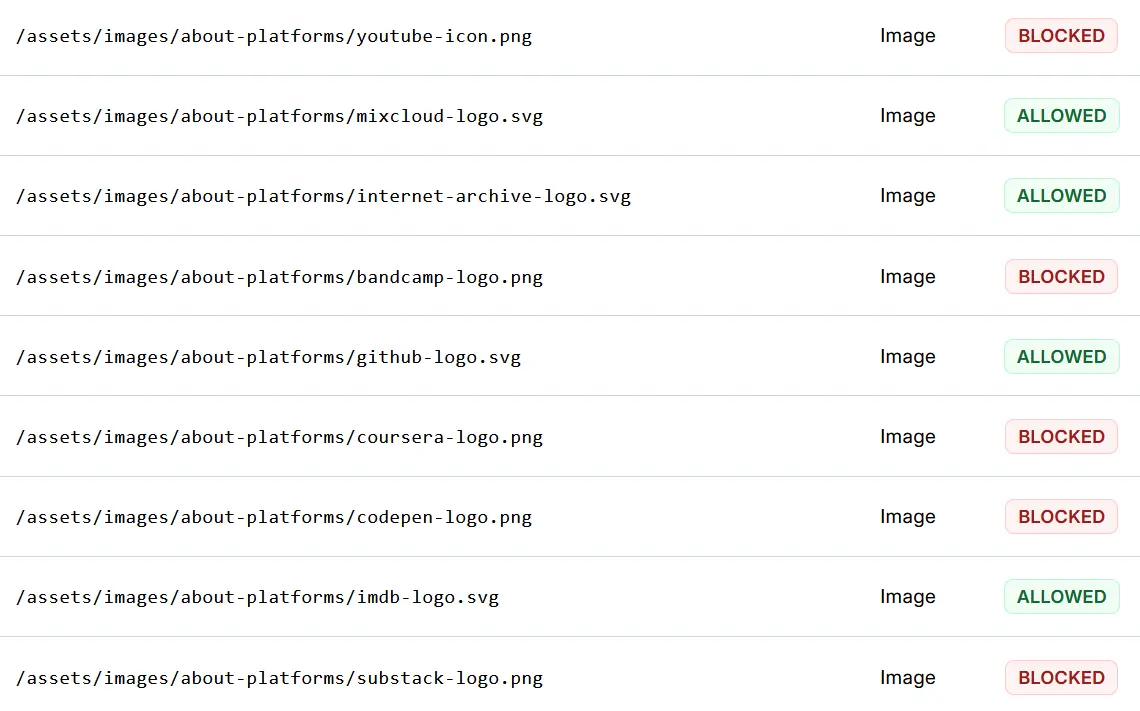
Checking whether a crawler is allowed to access a page is one thing. Knowing whether the same applies to the resources that page relies on is another. Enable Check resources, and the checker will attempt to retrieve the target page's HTML through the same fetching service used by Fetch Live, identify its referenced assets, and evaluate their URLs against the robots.txt rules in the editor. This includes stylesheets, JavaScript files, images (including responsive image candidates), favicons, selected preloaded resources, video, and audio. Relative URLs are resolved too, so you don't need to go hunting for absolute addresses.
The mode starts with Googlebot selected, although you're free to choose another crawler from the sidebar. Only one user-agent can be tested at a time here, since the idea is to inspect the resources of a particular page from the perspective of a particular crawler. Auto-check and the multiple URLs area are temporarily unavailable; press Check URL to run the inspection. Turn off Check resources, and your previous crawler selections return, along with the standard checking functionality.
There's also a Google-specific detail worth keeping in mind. When checking resources with Googlebot selected, image URLs are evaluated in the context of Googlebot-Image, and video URLs in that of Googlebot-Video. Both can have their own robots.txt rules, with Googlebot acting as a fallback when no dedicated group applies. So, a page might be allowed for Googlebot while one of its images is blocked for Googlebot-Image. The results identify the crawler context used, rather than leaving you guessing which rules were applied. This distinction belongs to resource checking; the regular URL tester evaluates the crawler you've explicitly selected.
User-agent: Googlebot
Allow: /

User-agent: Googlebot-Image
Disallow: /*.png
In this example, ordinary Googlebot crawling is allowed, but PNG images are restricted for Googlebot-Image. If a page references one of those images, the resource checker can identify the restriction under the corresponding Google image-crawling context. That doesn't mean every ordinary Googlebot request for the same URL would inherit the image-specific rule.
A small but important distinction: the checker examines the HTML it retrieves, not a fully rendered page. It doesn't execute JavaScript, discover resources introduced dynamically, or reproduce everything a real browser (or Google's rendering infrastructure) might request. It also doesn't download the individual resources or check whether their servers actually return them successfully. An Allowed result here means the evaluated robots.txt rules permit the request, not that the resource is necessarily available.
Resources hosted on another origin have their own robots.txt policies, which the checker doesn't automatically retrieve. These are reported as Inconclusive rather than applying the rules from your current editor to an unrelated host. A CDN-hosted image, for example, might have an entirely different crawling policy from the page referencing it. One robots.txt file doesn't govern the entire web, however convenient that would be.
There is no requirement to keep the tested URL(s) on the origin from which the rules were fetched. You could fetch Google's robots.txt, alter a few lines, and test an entirely unrelated website - for the fun of it. The tool warns you when the primary URL has a different origin from a fetched file; the same warning is not repeated beside every additional URL.
Bing Webmaster Tools also has a robots.txt tester for checking URLs against a site's rules. I've encountered some rather odd behaviour in its interface, although I wouldn't treat that as evidence of how Bingbot itself handles different origins. This checker deliberately lets you test a hypothetical robots.txt file against another origin, while warning you about the mismatch instead of preventing the experiment.
Refreshing the page resets the fields.
Reading your results
Allowed means the evaluated rules permit the URL under this checker's extensively researched matching model, whether a matching Allow rule wins, no applicable restriction exists, or the selected crawler is documented as ignoring robots.txt. Blocked means a matching Disallow rule wins. Inconclusive means the checker cannot establish a reliable result, for example because no rules or valid target URL have been supplied, or because wildcard applicability for certain special tokens is undocumented. In resource mode, it can also mean that a resource belongs to another origin or cannot be reliably evaluated with the available information. These classifications describe rules-based crawling permission, not whether an HTTP request would succeed, a crawler would actually visit, or a search engine would index the URL.
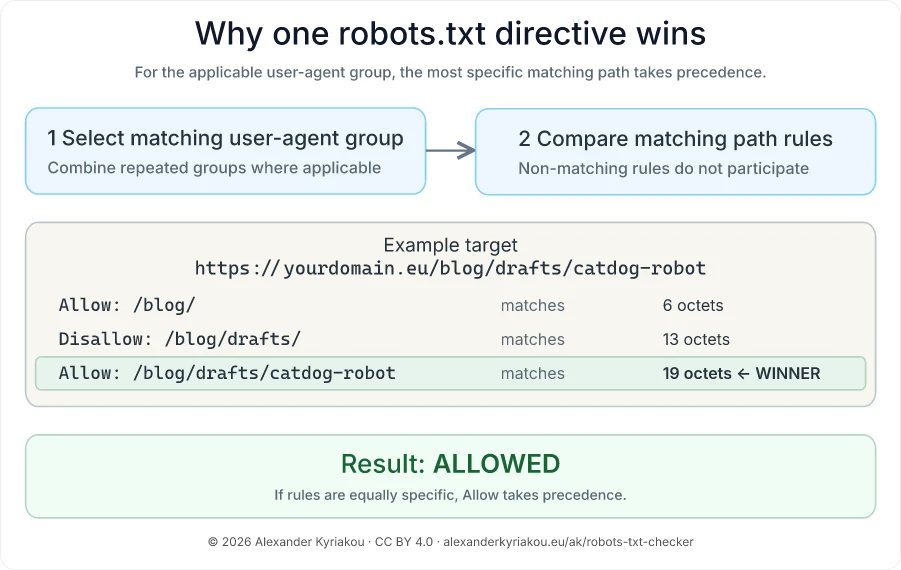
The Winning Directive column explains the decision. It may not be the first matching line: more specific rules take precedence, with Allow winning a tie under the standard matching model. Click a result row with a line number to jump to and temporarily highlight that rule in the editor. The small icon alongside a crawler name copies its robots.txt-friendly user-agent name (formally product token), which is what goes after User-agent:; it is not the full HTTP User-agent request header.
The indicator beside the primary URL describes its validity and whether the selected evaluations completed. It is not a single permission verdict for all crawlers. The pre-selected crawlers are my practical starting set, not a ranking of importance and certainly not a recommended blocklist. Change them as you wish.
TL;DR: Check the Reading the Results legend.
What robots.txt does, and where it lives
Robots.txt lets a website publish crawling preferences for automated clients that choose to follow them. A compliant crawler checks the file before fetching other resources within its scope and applies the relevant user-agent group and path directives. The idea is rather simple: give website owners a way to communicate with automated visitors collectively.
From a webmaster's headache to RFC 9309
In 1994, Martijn Koster proposed a way for website owners to tell robots which parts of a site they should skip. Crawlers were already making a nuisance of themselves by overwhelming servers. The proposal caught on, and search engines adopted it, but for a surprisingly long time the protocol was more of a shared convention than a formal Internet standard. Somewhat similar to what we're witnessing now with llms.txt: an idea gains attention and adoption before there's any certainty about whether it will become a formal standard.
That changed in September 2022, when the Internet Engineering Task Force published RFC 9309, the Robots Exclusion Protocol. An RFC (Request for Comments) is a technical publication used to define and document Internet protocols and practices. This one specifies how compliant crawlers should discover, parse, and match robots.txt rules, and what to do when the file is unavailable. It formalized a protocol the web had already been using since the 90s, although individual crawlers still have their own extensions and implementation quirks.
One website, potentially several robots.txt files
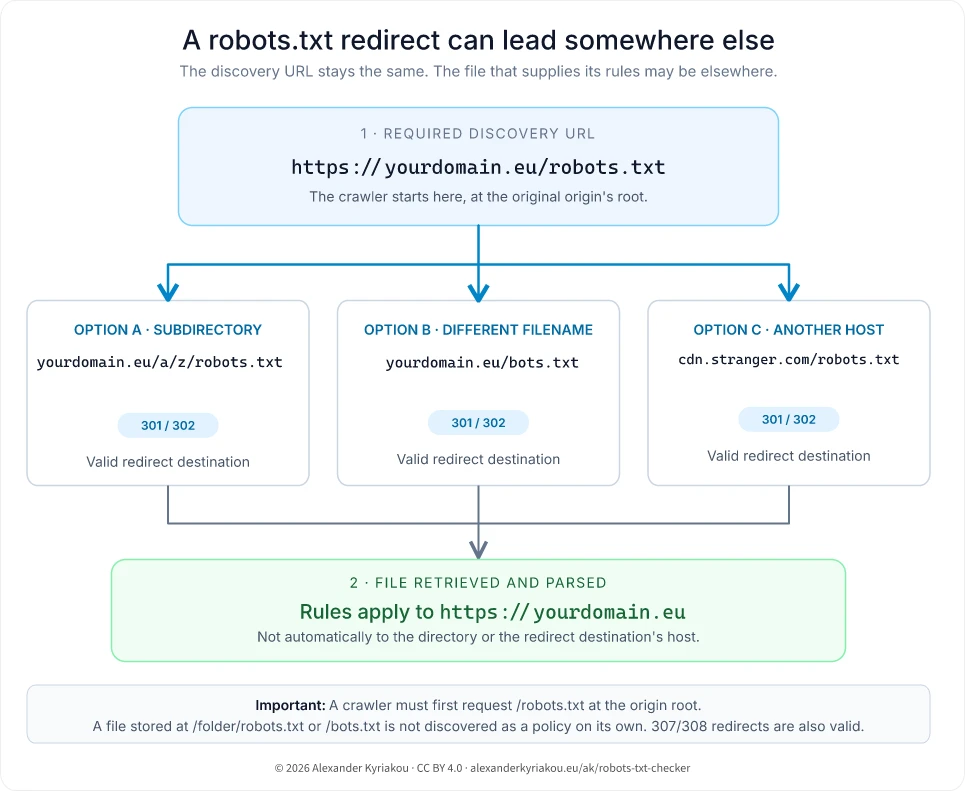
One of the more important details established by the protocol is where crawlers should look for the file, and which URLs its instructions apply to. Robots.txt belongs at the root of the particular origin it is meant to govern. A file at /folder/robots.txt is just another file, not the robots.txt discovery location for that origin.
https://yourdomain.eu/robots.txt
https://www.yourdomain.eu/robots.txt
https://blog.yourdomain.eu/robots.txt
These are potentially three different policies. The same separation applies to HTTP versus HTTPS, and to different network ports. I've encountered the assumption that a file on the main domain automatically governs its subdomains more than once; it doesn't. If you manage several hosts, check the file and its served HTTP status by each one rather than expecting the apex/root domain's instructions to travel around with them.
A root robots.txt URL may redirect to another location, including a subdirectory, a differently named file, or even another hostname. When successfully retrieved, its rules apply to the original origin, not the redirect destination. RFC 9309 recommends that crawlers follow at least five consecutive redirects, including those between different hosts. The checker follows up to five such redirects and reports how many were encountered, along with the final URL where applicable. Redirect loops or chains exceeding that limit result in a retrieval error, rather than an assumption about what the crawler would ultimately find.
There's a related detail with www and non-www hostnames. If the requested www hostname cannot be reached, the fetcher may attempt its apex counterpart as a fallback. That's a separate request, not evidence of an HTTP redirect. The interface makes the distinction explicit because retrieving https://yourdomain.eu/robots.txt doesn't automatically establish what https://www.yourdomain.eu/robots.txt serves. Different origins, potentially different rules.
Robots.txt is neither authentication nor a confidentiality mechanism. Naming /admin/ or /internal-documents/ in a public file might even advertise a directory's existence. Use access controls for private resources. And remember: robots.txt regulates crawling by cooperating clients; it does not automatically remove known URLs from search indexes!
There's also a modern complication: your hosting or CDN provider might modify what gets served at /robots.txt. Cloudflare, for example, offers managed robots.txt directives that can be added to an existing file or served when the origin doesn't provide one. Some of these concern AI crawlers and content-use preferences rather than the standard Allow and Disallow rules. Another reason to inspect the actual HTTP response instead of assuming the file on your server tells the whole story.
When the file cannot be retrieved
The response to the robots.txt request matters independently of whether normal pages appear to work. A real HTTP 404 or 410 generally means that no restrictions are available. A temporary server failure is another story.
| Response | Meaning for crawling |
|---|---|
| 200 | Parse the returned file. A successful response alone doesn't mean the directives are correct. |
| 404 / 410 | File unavailable; compliant crawlers may proceed without robots.txt restrictions. A missing file is not inherently an SEO error. |
| 401 / 403 | RFC 9309 treats these as unavailable. Google likewise treats 4xx responses other than 429 as no restrictions; they are not a reliable way to block Googlebot. |
| 429 | Rate limiting; Google treats this as a server-error condition rather than its usual 4xx behaviour. |
| 500–599 | Unreachable under the RFC: initially assume a complete disallow. Google's documented recovery process involves retries and, where available, previously cached rules. |
| DNS, TLS, timeout or connection failure | Potentially unreachable, not proof of a missing file. Client-specific recovery behaviour can differ. |
One of the more unpleasant situations I've faced was a robots.txt endpoint returning HTTP 500 while the file itself looked perfectly normal when opening in any browser. That's why a simple visual check of 'Does this load?' ain't enough. Google documents an initial halt in crawling when it cannot retrieve robots.txt because of a server error, followed by a longer recovery process that depends partly on its last usable cached copy. A repeated 500 is therefore worth investigating quickly, even if nobody is reporting a broken page. See Google's robots.txt error handling for its current time windows and exceptions.
For operational clarity, I generally prefer an intentional, valid file returned with HTTP 200, even when it simply allows all crawling. But a genuine 404 for a file that doesn't exist is not automatically wrong. The important part is knowing which response your server actually sends and whether that behaviour matches your intent.
The cached version might be different
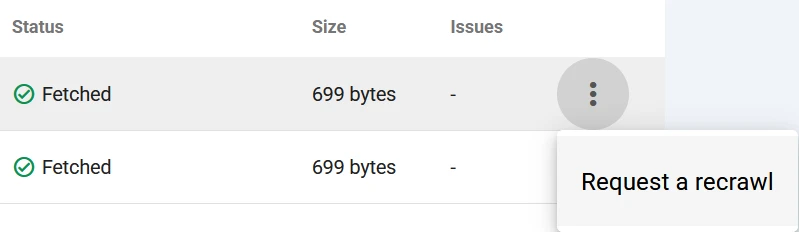
Changing robots.txt on your server does not mean every crawler immediately uses the new version. RFC 9309 recommends generally limiting cached robots.txt use to 24 hours, with exceptions for unreachable files. Google usually caches the file for up to 24 hours, may honour HTTP cache headers, and can keep a cached version longer when it cannot refresh it. It also allows for manual crawl request in GSC, Settings > Crawling: robots.txt Report > Menu: Request a recrawl. Other crawlers have their own schedules.
A successful live fetch in this checker shows what the Cloudflare Worker was able to retrieve at that moment. It doesn't mean Googlebot, Bingbot, or another crawler would receive the same response, nor can it tell you which version they currently have cached. Different request origins, security policies, and caching behaviour can all affect what a crawler actually encounters. Avoid assuming a restriction has taken effect everywhere because a local test looks correct.
Reading and writing the rules
A basic file is made of groups of user-agent declarations followed by Allow and Disallow path rules. A Sitemap: line can also advertise a sitemap location, although it is not itself a crawl-permission rule. Blank lines are fine, and comments begin with #.
# A fun note for meat proxies
User-agent: *
Disallow: /drafts/
Allow: /drafts/public/

Sitemap: https://yourdomain.eu/sitemap.xml
In this wildcard group example, /drafts/notes is blocked while /drafts/public/overview is allowed: the longer matching Allow rule takes precedence. A group can contain multiple user-agent lines before its rules, and repeated groups for the same product token must be combined by a compliant parser.
One less obvious detail: a crawler's specific user-agent group generally takes precedence over the wildcard group. For Google, rules in User-agent: * aren't automatically added to a matching User-agent: Googlebot group. If you define separate groups, make sure the restrictions you actually want are present in the relevant one.
Wildcards, encoding, and rule specificity
For URL patterns, * matches any sequence of characters and a trailing $ anchors the end of the URL path-and-query match. For example:
User-agent: *
Disallow: /*?sort=
Disallow: /downloads/*.pdf$
Allow: /downloads/public/
The first rule catches URL representations containing ?sort=; it is not an assertion that every possible ordering of query parameters is blocked. The second matches PDF-ending URLs in /downloads/, subject to rule precedence. Query strings matter during matching, but URL fragments (the portion beginning with #) are not sent in HTTP requests and are not part of the evaluated URL.
These wildcards do not apply to crawler names. This is not a valid way to collectively address every Googlebot variant:
User-agent: Googlebot*
Disallow: /
Declare supported product tokens separately where necessary, and check the operator's documented fallback behaviour. Googlebot-Image and Googlebot-Video, for example, can use Googlebot rules when they do not have their own applicable group, something that you'll notice while using the checker. The general fallback cannot simply be inferred for every crawler whose name looks similar.
Directive names and user-agent product tokens are matched case-insensitively per RFC 9309 Section 2.2.1, with one experienced exception for LinkedInBot which I addressed in the parser. But URL paths are case-sensitive under Google's robots.txt matching model. Consequently, Disallow: /Images/ and Disallow: /images/ are not interchangeable(!). In the checker, I've made directive and user-agent matching case-insensitive, so allow and Allow are treated equally, for example. Robots.txt uses UTF-8, and matching gets a little more interesting when percent-encoded characters enter the picture. For example, /c%61t/ and /cat/ can represent the same path for matching purposes, while encoded reserved characters need more careful treatment. The checker accounts for these distinctions, including encoded characters that might otherwise be mistaken for wildcard operators, and calculates rule specificity accordingly. That doesn't make it a complete reproduction of every crawler's matching implementation, but it avoids treating all percent-encoded characters as interchangeable.
Similar-looking characters can cause problems with crawler names, too. Copy a user-agent token from a formatted document, for example, and you might end up with a Unicode hyphen that looks almost identical to an ordinary one. Take User-agent: Perplexity‑User, where the separator is a non-breaking hyphen (U+2011) instead of the ASCII hyphen (U+002D) used in User-agent: Perplexity-User. The two might look interchangeable to us, but not to a robots.txt parser. The checker flags such declarations and suggests the correct spelling without silently changing the file. One of those tiny mistakes that can be annoyingly difficult to spot.
Empty values and parser notes
An empty Disallow: doesn't block everything; it has no effect. An empty Allow: also has no meaningful effect. That's different from Allow: /, which is an actual matching rule for root-relative URLs. If you want to express that the default group has no restrictions, this is sufficient:
User-agent: *
Disallow:
The editor warns about malformed declarations, empty or invalid user-agent values, misplaced Allow or Disallow directives, and path rules that don't begin with /. It also recognizes some common non-standard names, including Crawl-delay, without applying them in the evaluation. Invalid declarations are flagged rather than silently corrected, and those that cannot be interpreted reliably are excluded from rule evaluation. These notes are practical diagnostics, not a certificate of complete RFC compliance. I've tried to anticipate, through my own experience and research, as many edge cases as possible, although I'm sure a few have stayed out of my radar. They'll probably make themselves known eventually.
Crawl-delay is a good example of how robots.txt support differs between search engines. Google doesn't recognize the directive, while Bing has documented its support since at least 2009. Bing also offers Crawl Control in Webmaster Tools, allowing website owners to adjust crawling activity throughout the day. However, according to Bing's documentation, a Crawl-delay directive in robots.txt overrides those crawl-rate settings. It's a detail worth remembering when configuring both, and a good illustration of why RFC 9309 doesn't tell the whole story about how individual crawlers behave.
For a more authoritative reference on how Google interprets robots.txt rules, Google has published its open-source robots.txt parser and matcher, derived from the code used by Googlebot. Unlike this checker, which I've built in JavaScript with additional crawler-specific assumptions (e.g. fallback policies) and an interactive interface, Google's library focuses on parsing and matching rules according to its implementation. It's a useful reference for investigating unusual matching behaviour, particularly around encoding, specificity, and other edge cases where implementation details matter. I've accounted for several of these in my own parser, but Google's implementation remains the more authoritative reference for understanding Googlebot's matching behaviour.
Should you let an LLM write your robots.txt?
It's tempting nowadays to ask an LLM for a robots.txt file, upload the file, and consider the job finished. The file is short, the syntax looks uncomplicated, and the generated answer usually arrives with a reassuring explanation. That combination makes it rather easy to publish something you haven't properly checked.
An LLM can help explain an existing rule or draft a starting point for an experiment. But it has no automatic knowledge of your actual URL patterns, infrastructure, crawler priorities, or which directories need to stay crawlable. It can produce a perfectly parseable rule that blocks an entire image directory, suggest a made-up crawler token, or put Noindex: in robots.txt even though Google doesn't support it there. A syntactically valid file can still be the wrong file for your website.
# This can look reasonable in a generated example
User-agent: *
Disallow: /assets/
Disallow: /*? # With you serving your core pages with parameters~
Are images, style files, scripts, or other useful resources under /assets/? Then the proposed restriction deserves a closer look. I'd use an LLM to explore possibilities, not to make the final crawling decision. Check every directive against the intended crawler's documentation, test representative URLs and exceptions, use the resource checker to catch any referenced assets that your rules might unintentionally block, and inspect the actual published response afterward. If the result is difficult to explain line by line, it probably isn't ready to deploy.
But Alex, my website is completely vibe-coded, not even then?
If you've entrusted your whole website to some trust-me-bro app, agent, or LLM chat, it might have enough context to know what's going on and which resources are important for crawlers. Personally, I still wouldn't trust it to make that decision without checking, unless you're happy with an Allow Everyone and Everything approach. But whatever you choose, at least don't serve your robots.txt with an HTTP 500 error.
Not all crawlers are created equal
Writing the rules is one thing; knowing which crawlers they address is another. It'd be much easier to think of crawlers simply as search engines collecting pages for their indexes. That picture now leaves out quite a lot: search bots, image and news fetchers, social preview generators, SEO tools, independent search infrastructure, AI training collection, AI search discovery, and user-initiated retrieval. Some of these use distinct HTTP identities; some are control tokens that don't send HTTP requests under their own names at all.
An interesting example of a token naming confusion was documented by 404 Media in 2024. Hundreds of websites were explicitly blocking older Anthropic crawler identifiers while overlooking the newer ClaudeBot. Anthropic later confirmed that ClaudeBot would honour existing restrictions targeting those older identifiers, but the situation illustrates how easily crawler blocklists can become outdated, especially when they're copied from one website to another without checking (the theoretically updated documentation out there) whether the listed agents are still active.
I spent considerable time sorting the user-agent catalogue into useful groups and looking for first-party descriptions. The difficulty isn't always finding a name; it's finding a dependable explanation of what that name does today. Legacy identifiers, user-configurable crawler frameworks, and community-reported names add uncertainty and confusion. Inclusion in my user-agent list therefore isn't a guarantee that a bot is active, official, or even well documented. Well-known operators usually have more detailed public documentation, but that doesn't mean every crawler claiming their identity is genuine.
A token isn't necessarily the HTTP User-Agent
A robots.txt product token is the identifier you can use in a User-agent: group. The full HTTP User-Agent header can contain browser-like information, version numbers, and a URL describing the crawler. It can also be spoofed. When identity matters, verify requests using the operator's documented IP ranges and DNS procedures rather than trusting a string. I've made a separate Crawler IP Verifier for that purpose, as a companion to this checker. One evaluates the rules you've written for a crawler; the other helps establish whether a request actually came from the operator it claims to represent.
For the checker I'm storing token names in lowercase for case-insensitive matching and standardization; your robots.txt file does not need to use lowercase. Some user-agent entries have documented fallback tokens. Some special controls return Inconclusive when their applicability to a wildcard group is not established. These are modelling choices, not a promise to reproduce every operator's (unknown) internal policy.
Training, discovery, and user-triggered requests
OpenAI documents separate purposes for GPTBot, OAI-SearchBot, and ChatGPT-User. Anthropic also distinguishes ClaudeBot, Claude-SearchBot, and Claude-User. Mistral documents its own indexing, training, and user-driven fetcher identities. Blocking an AI training crawler is therefore not synonymous with blocking every AI-assisted search or user-requested visit.
This distinction also matters when thinking about SEO and its newer relatives, Answer Engine Optimization (AEO) and Generative Engine Optimization (GEO). Giving an AI search crawler access is one consideration; whether your content is discovered, used, cited, or represented accurately is another. Robots.txt can influence some of the fetching involved, but it doesn't determine the final outcome.
Google-Extended is especially instructive: it is a robots.txt control token for specified Gemini-related uses, not an independent HTTP-fetching crawler. It does not control inclusion in Google Search. Apple also documents Applebot-Extended as a separate data-use control. Treat controls of this kind as product-specific preferences, not proof that a particular HTTP request will be denied.
Google has since introduced another layer of control on August 31, 2026, this time outside robots.txt. Through Search Console's Search generative AI control, you can choose whether your website content is eligible to appear in AI Overviews, AI Mode, and generative AI features in Discover. Inclusion is the default, although it guarantees nothing about actually appearing. Excluding your website doesn't remove it from regular Google Search, nor does the setting control AI training. That's still a separate matter, addressed through Google-Extended. Quite a few different controls for what might initially look like the same thing.
This checker represents some of these differences and deliberately leaves certain wildcard scenarios or crawler-specific behaviours inconclusive rather than assigning a verdict it can't reliably support. Not every user-triggered fetcher behaves like Perplexity-User, either. Consult the relevant operator documentation before treating an Allowed or Blocked result as definitive.
Who should be allowed?
There is no universal answer, and a blocklist without a reason was never much of a strategy. Blocking Googlebot or Bingbot certainly undermines discoverability in their search ecosystems. Blocking social-preview fetchers can affect how shared links appear. Restricting SEO crawlers can reduce third-party data collection but may interfere with an audit you actually want to run. Blocking Common Crawl or AI training crawlers involves a different choice from allowing AI search discovery or on-demand page retrieval.
I'm personally sympathetic to independent search indexes and the efforts to build a more diverse search ecosystem, including initiatives such as OpenWebSearch.eu and services such as Mojeek and Seznam. Qwant's indexing partnerships also illustrate why "European search engine" and "entirely independent index" are not the same thing. Anti-monopoly and a less concentrated web are worthwhile goals to me, but every website still needs to make its own decision about access, cost, and reuse.
I've deliberately included a collection of web scrapers in the checker, some of which have rather unclear identities or purposes. For aggressive or unidentified ones, robots.txt may not be enough. Rate limiting, authentication, abuse detection, and server-side controls can be more appropriate. And when something claims to be Googlebot, its name alone is not sufficient evidence. That's also where the Crawler IP Verifier comes in, helping you check an IP address against the verification methods documented by crawler operators.
The 2025 HTTP Archive Web Almanac offers useful perspective: in its desktop sample, GPTBot appeared as a named robots.txt user-agent on 4.5% of sites, a 55% increase from 2024. While the figures don't tell us whether those websites are allowing or restricting GPTBot, they do show that explicit references to AI crawlers are becoming more common.
Crawling, indexing, and the things between them
One of the recurring SEO problems with robots.txt is expecting it to solve a problem that actually belongs elsewhere. Crawling, indexing, canonicalization, HTTP response handling, and access control are related systems, but they're not interchangeable.
When a path restriction takes out images or icons
I've seen image paths blocked and icon paths caught by a broad robots.txt restriction. A rule that looks harmless because it targets "assets" can prevent compliant crawlers from fetching images needed for image search or for understanding and presenting a page. Google's documentation connects the availability of images and other page resources with search features and rendering. Sometimes I wonder if someone suggested blocking those resources in an attempt to improve PageSpeed scores. It wouldn't improve the actual Core Web Vitals experienced by users, but the things people do.
User-agent: *
Disallow: /images/
Disallow: /static/
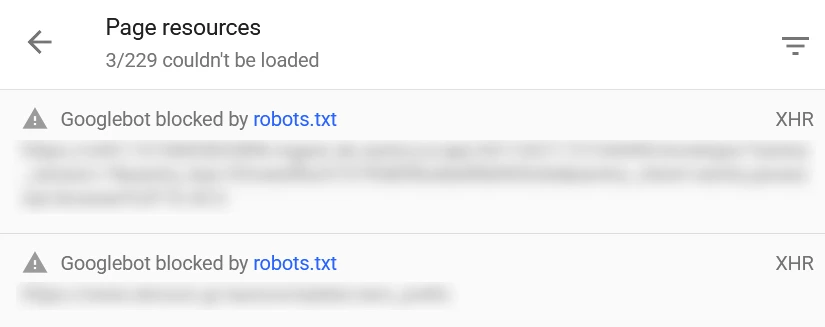
This might be intentional if keeping those resources out of crawlers is the goal. But if you expect those assets to appear in Google Images, support search features, or be available when a crawler renders your page, it's worth reconsidering. A resource loading perfectly fine in your browser doesn't necessarily mean a crawler is permitted to fetch it. With Check resources, you can inspect the resource URLs referenced in a page's HTML and see whether your current rules would allow the selected crawler to fetch them, without identifying every stylesheet, image, or script manually. It doesn't tell you whether Google actually fetched or rendered those resources, though. For that, Google's Rich Results Test and URL Inspection Tool provide a more direct view of Google's testing and rendering behaviour. For the latter, run a live test and open View Tested Page > More Info > Page Resources.
Robots.txt, noindex, and canonical tags
Consider a page with <meta name="robots" content="noindex" OR content="none"> in its HTML, OR X-Robots-Tag: noindex in its HTTP response headers, while also being blocked by Disallow: /related-path/. Google needs to request the URL to discover either instruction. If robots.txt prevents that request, the crawler won't see the noindex directive, and the URL may still appear in search results.
The same basic limitation applies to a canonical tag within blocked HTML and HTTP header. A canonical is a signal about the preferred representative among duplicate URLs; blocking access can prevent that signal from being read. If a resource moved permanently, a relevant redirect is usually a stronger, more direct signal. Blocking the page in robots.txt does not guarantee that it will stay out of search results(!). If the content is confidential, use proper access controls rather than relying on either directive.
Staging environments are a particularly good example. I've encountered setups that rely on Disallow: / to keep an unfinished website out of search results, but that isn't access control or a guarantee against indexation. If the environment shouldn't be publicly accessible, protect it with authentication or network restrictions. If it's intentionally public but shouldn't be indexed, a supported noindex instruction may be appropriate, provided the crawler can access it. And if you're moving the finished site into production, don't forget to check which restrictions came along for the ride.
The deleted pages that remained blocked and indexed
Another sequence I've run into: a directory was first disallowed in robots.txt, and later its pages were removed so they returned HTTP 404 to users. The removal had happened on the server, but the robots.txt restriction remained in place.
A compliant crawler still sees the disallow and avoids requesting those URLs, thus their HTTP headers. It never gets the opportunity to observe their new 404 responses. A URL already known to a search engine may consequently remain in its index longer than expected, and probably you might have experienced it some times, opening a page just to see their 404 design. Removing the Disallow, where safe and appropriate, lets crawlers revisit those addresses and observe that the resources are gone.
For pages with a genuine replacement, use an appropriate redirect. For permanently removed pages, let crawlers observe a 404 or 410 when possible. I would treat endless autogenerated URL combinations differently: allowing every combination to be crawled merely to return a 404 can waste considerable resources.
Crawl budget, without the obsession
Google describes crawl budget in terms of crawl capacity and crawl demand: how much crawling a site can accommodate, and how much Google wants to crawl. This becomes particularly relevant for websites generating large numbers of URLs, such as news outlets and ecommerce stores with extensive filtering options. Different combinations of categories, colours, sizes, sorting options, and query parameters can produce thousands of URLs containing essentially the same information. Robots.txt can help prevent crawlers from spending time requesting combinations that serve little to no purpose, provided those URLs aren't needed to be served to users (indexed). However, blocking them doesn't guarantee Google will spend the saved crawling capacity elsewhere on your website.
I tend to start paying closer attention to crawl efficiency from 50.000 pages and onwards, particularly for self-hosted websites, large ecommerce stores, news outlets, or sites with rapidly changing content. It's a personal benchmark, not something prescribed by Google. If your website is relatively small and important pages are getting crawled without substantial delays, there are probably more interesting things to address.
Some encountered (and debated) robots.txt misconceptions
- “Disallowing a URL prevents it from being indexed.”
- Blocking a page with robots.txt prevents compliant crawlers from fetching it, but Google can still index the URL if it discovers it through links or other signals. Search Console may report it as "Indexed, though blocked by robots.txt", and the search result may contain limited information about the page, as in the example below.
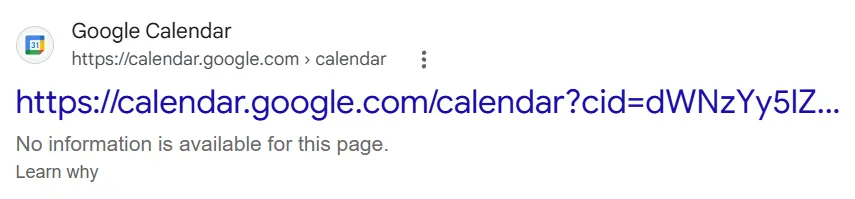
A URL can still appear in Google Search even when robots.txt prevents Googlebot from fetching its content. - “Rules are read sequentially from top to bottom.”
- Robots.txt isn't a first-match-wins list. Under the standard matching model, the most specific matching path rule takes precedence, regardless of where it appears in the file. When equivalent Allow and Disallow rules conflict, Allow wins the tie.
- “A single robots.txt file covers your entire domain and all subdomains.”
- A robots.txt file only governs the exact protocol and subdomain where it is hosted. Placing one at
yourdomain.eudoes not automatically apply rules tosubdomain.yourdomain.euor switch between HTTP and HTTPS. - “Robots.txt is a secure way to hide private folders or files.”
- The file is public. Listing sensitive directories or admin paths in a robots.txt acts like a neon sign telling bad actors and scrapers exactly where your hidden content is located.
- “Allowed means the crawler will visit.”
- It only means the evaluated rules do not prohibit that URL. Discovery, demand, server access, and the crawler's own priorities still matter.
- “A 404 robots.txt is automatically broken SEO.”
- It simply means no robots.txt restrictions exist. Don't confuse a missing file with an unreachable one.
- “All bots respect the file.”
- The protocol is cooperative. Some clients ignore it, and others are configurable or deliberately misidentify themselves.
- “Blocking AI training bots prevents all AI-related use.”
- Different products may involve different crawlers, existing indexes, user-initiated fetches, and contractual or technical controls. A robots.txt preference is not a universal licence or enforcement mechanism.
- “A live checker shows exactly what Google and other user-agents see.”
- This particular checker retrieves robots.txt through its own Cloudflare Worker, not through Googlebot, Bingbot, or whichever crawler you've selected. The retrieved file is evaluated against that crawler's documented rules, but the actual crawler might encounter a different response, have older rules cached, or follow its own retrieval and error-handling policies. A successful fetch here confirms what this checker's infrastructure received, not what every crawler sees.
- “You can use 'Noindex' inside robots.txt.”
- Google stopped supporting the unofficial
Noindex:directive in robots.txt on September 1, 2019. To remove a page from Google's index using a supported noindex instruction, the crawler must be allowed to fetch it so it can read a metanoindextag or HTTP response header. - “Blocking JavaScript assets improves crawl efficiency.”
- Blocking content-critical CSS, JavaScript, or API endpoints can prevent search engines from rendering your pages accurately, potentially leaving important content or page elements unavailable to the crawler. Whether that happens depends on what the blocked resources actually provide.
- “Adding * at the end of a Disallow rule makes it cover all subdirectories.”
- It already does. A rule such as
Disallow: /images/matches URLs beginning with that path, including files and nested directories. Adding a trailing wildcard, as inDisallow: /images/*, doesn't extend its coverage. Wildcards become useful when matching variable parts within a URL, while$can be used to require a match at the end. - “Server downtime on robots.txt just pauses crawling temporarily.”
- A
5xxresponse can have different consequences depending on the crawler, how long the error persists, and whether a cached file exists. RFC 9309 calls for initially assuming a complete disallow when robots.txt is unreachable. Google documents a more detailed recovery process, including an initial crawling halt, retries, and possible use of cached rules. If the problem continues, Google may eventually crawl without robots.txt restrictions, depending on the site's wider availability. A broken robots.txt endpoint is therefore worth investigating rather than treating it as a harmless pause.
A few practical questions
Why won't the checker fetch a site's robots.txt?
Live fetching runs through a dedicated Cloudflare Worker, so the usual browser CORS restrictions aren't an obstacle. But DNS failures, TLS errors, timeouts, server-side security rules, rate limits, redirect loops, or an excessive redirect chain can still prevent retrieval. Some websites may also restrict requests coming from Cloudflare's infrastructure. The fetching service has its own limits, too, so it isn't guaranteed to reach every website. A failed request doesn't prove the file is missing. You can always paste its contents into the editor or load a local file to continue testing.
Why did the checker fetch a different hostname?
The website might have redirected its robots.txt request to another hostname, which the checker follows and reports. Alternatively, if a www hostname couldn't be reached, the fetcher may have tried its non-www counterpart. These aren't the same thing. A successful fallback doesn't verify that the original hostname redirects correctly or serves the same robots.txt rules. Check the status message to see what got flagged.
Why doesn't Check resources find every image or script?
Because it examines the HTML returned for the target page, not the page after JavaScript has run. Some resources are introduced dynamically, loaded only after an interaction, or requested through CSS and JavaScript rather than referenced directly in the HTML. They won't necessarily appear in the results. Think of it as inspecting the page's initial resource references, not recording everything a browser might eventually load.
Why are some resources marked Inconclusive?
They might belong to another origin, have an invalid or unsupported URL, or otherwise lack the information needed for a reliable evaluation. A resource hosted on a CDN, for example, is governed by that origin's own robots.txt file rather than the one you're currently editing. Inconclusive doesn't mean the resource is blocked, broken, or unavailable; it means the checker can't establish its crawling permission from the current information.
Does Allowed mean the resource is accessible?
Nope. It means the evaluated robots.txt rules would permit the selected crawler to request that URL. The resource checker doesn't fetch each discovered stylesheet, script, image, or other asset individually, so it can't confirm whether the URL returns HTTP 200, requires authentication, redirects elsewhere, or fails altogether. Think of it as testing crawling permission, not actual resource availability. For the latter, you'll need to inspect the HTTP responses or use a browser's developer tools and the relevant search engine's inspection tools.
Why do two crawlers get different answers?
They can match different user-agent groups, have documented fallback identities, or be subject to a special policy. Check the Winning Directive and the crawler's descriptive note rather than comparing only the coloured labels.
Why is the result inconclusive?
The input may be missing or invalid, the editor may not contain any rules to evaluate, or the checker may deliberately avoid guessing about a special token's wildcard behaviour. It is a statement about the evidence available to the tool, not proof of a real crawler error.
Can I test a different domain with rules I've edited?
Yes. That is one of the reasons the editor exists. Just remember that applying a hypothetical file to another origin does not mean that origin actually serves or follows those rules.
When robots.txt gets a little less serious
A robots.txt file is intended for automated clients, but it is also a public text file that curious humans occasionally open. Comments beginning with # don't change crawling decisions, which leaves a little room for jokes, recruiting notes, tiny artworks, and messages to fellow web wanderers. Here's an example from Skroutz's robots.txt, retrieved on October 15, 2026:
# Hello, web crawlers and curious humans!
# This file is here to guide well-behaved bots through the Skroutz universe.
# We’ve crafted these rules to keep our servers happy and our users even happier.
# If you're a bot, please play nice. If you're a developer, you know what to do.
I like this small corner of web culture: an operational file becoming an accidental noticeboard. Just keep the actual directives readable. A crawler isn't expected to appreciate the joke, and the humans troubleshooting your site shouldn't have to excavate the rules from an ASCII mural.
Further reading and listening
For the protocol itself, begin with RFC 9309. For Google's implementation details, read Google's robots.txt specification and its crawler catalogue. For differences in AI-related purposes, the OpenAI crawler documentation and Anthropic's crawler guidance are useful starting points. The 2025 Web Almanac SEO chapter adds measurements from real websites.
For something less like reading a specification, try Analysing Robots.txt at Scale with HTTP Archive and BigQuery, a Search Off the Record discussion with Martin Splitt and Gary Illyes about examining robots.txt across websites. Another relevant conversation is The Past, Present, and Future of Robots.txt, for historical context around the protocol. Both are more useful complements to testing than yet another collection of copy-and-paste blocking rules.
Ooof, end of the jargony wall of text. Go block some robots!
PS: Some related articles might make a useful follow-up to this tool. PPS: For any issues you encounter, or suggestions and corrections to the user-agent list, send me a note.
License and attribution. © 2026 Alexander Kyriakou. The Robots.txt Checker's original parser and dedicated JavaScript are licensed under CPAL 1.0, with applicable attribution under Section 14. Original written content, visual design and diagrams are licensed under CC BY 4.0, unless otherwise noted. See the tool-specific license details, attribution notices and full software license. Original tool. Third-party material retains its own license.
Updates
- References and interlinking with the newly published Crawler IP Verifier.
-
Improved
LinkedInBotuser-agent matching and added a parser note for nonstandard capitalization.